
Clearer project and payment decisions
UX Content Collective course project · July 2026
I audited and revised a freelancer flow for project setup, budget approval, billing, and payment.
Role: UX Writer & Content Designer
Tools: Figma and Google Docs
Deliverables: Revised UI copy and a content style guide
This fictional project includes no live research, analytics, or shipped results. I revisited it after the course to explain my decisions and what I would improve.
The challenge
The original freelancer flow asked people to make important decisions without always making the next step clear. In some places, the copy did not explain what they were sending, who would receive it, or what would happen afterward.
The problem showed up in three moments:
- Inviting a business into a project
- Sending a project budget for approval
- Choosing how to receive payment
I was not trying to make the interface sound nicer. I wanted the copy to answer the questions that could make someone hesitate: What am I doing? Who will see it? What happens next?
My approach
I reviewed the three freelancer-flow screens shown here. I compared the original copy with my revisions and checked each choice against the JobPay style guide.
The guide gave me a consistent system to work from:
- Use plain English for people with different levels of product and financial experience
- Give headings a clear task, then use supporting copy to explain why the step matters
- Use consistent preferred terms such as Business, Bill, Message, and Pay
- Use Title Case for page headings, sentence case for buttons, contractions for a human tone, and USD before financial amounts
The content system behind JobPay
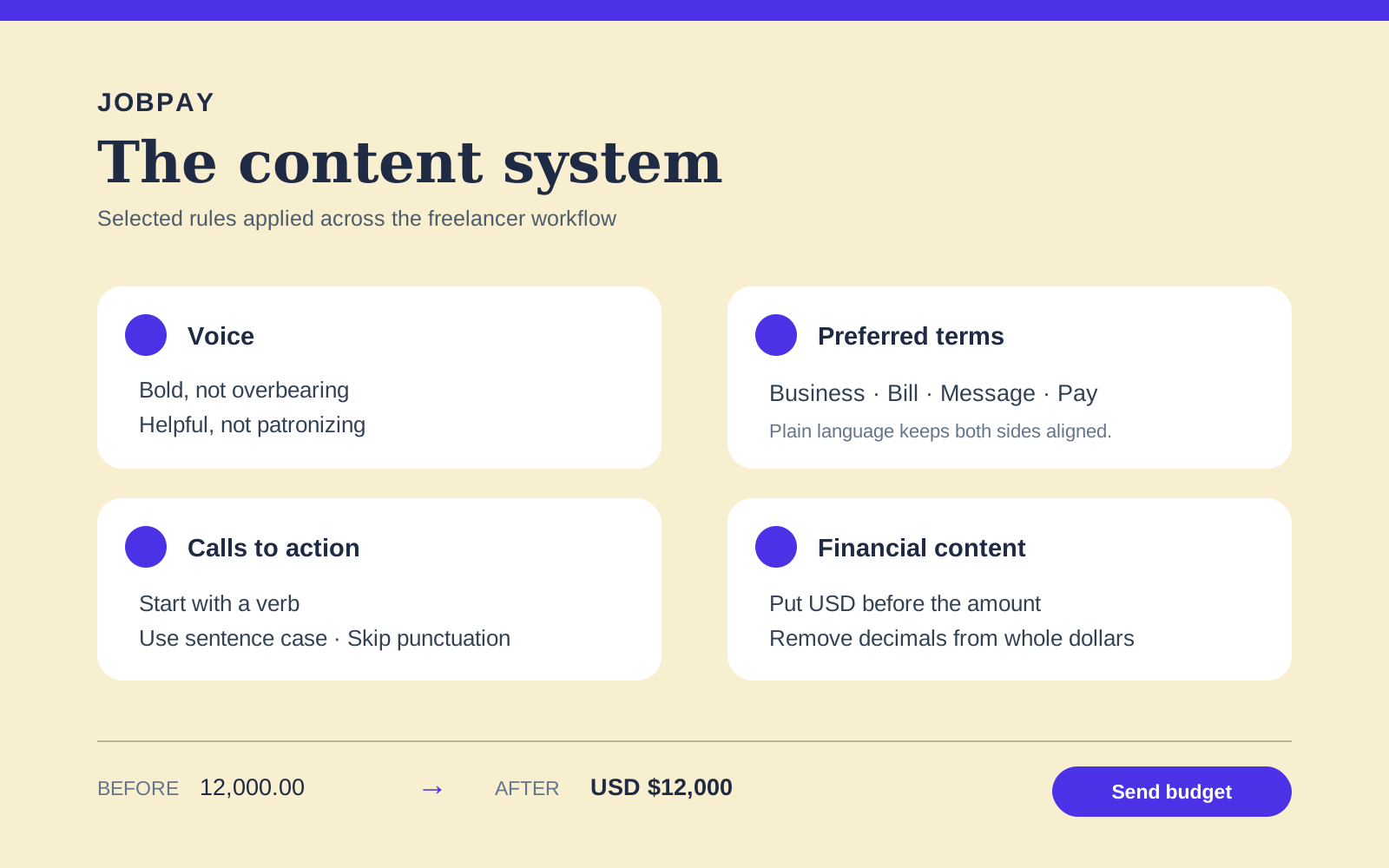
- Terms: Use Business, Bill, Message, and Pay consistently across both sides of the workflow.
- Actions: Start calls to action with a verb, use sentence case, and skip ending punctuation.
- Money: Put USD before amounts and remove decimals from whole-dollar totals.
- Voice: Be bold, helpful, and simple without sounding overbearing, patronizing, or complicated.
View the complete JobPay content style guide
Make budget approval specific
User goal: Understand the budget, send it for approval, and know what happens next.
Before
After
What changed
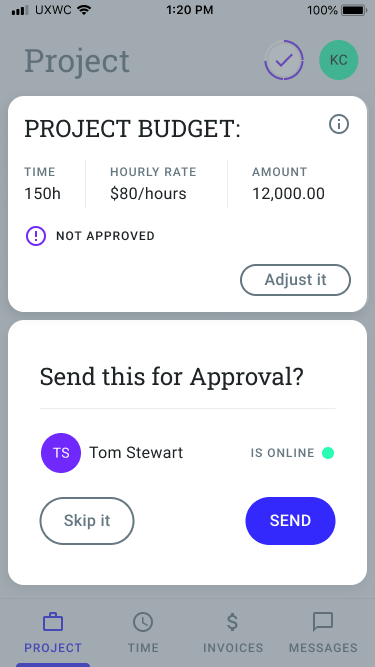
Before: “PROJECT BUDGET:”, “NOT APPROVED”, “Adjust it”, and “Send this for Approval?” The amount appeared as “12,000.00” without a currency identifier.
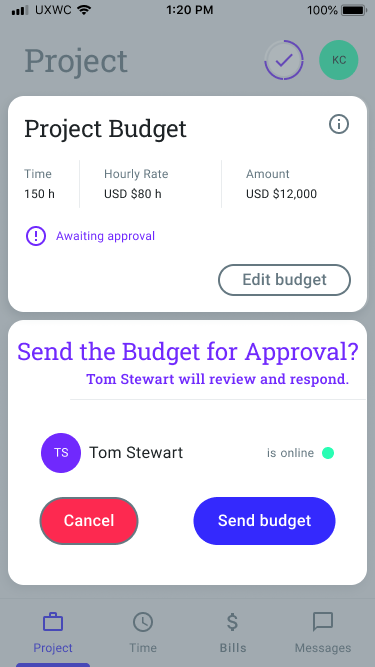
After: “Project Budget”, “Awaiting approval”, “Edit budget”, and “Send the Budget for Approval?” Supporting copy explains, “Tom Stewart will review and respond.” Buttons are “Cancel” and “Send budget.” Financial values use “USD $80 h” and “USD $12,000.”
Why I made this change
Budget approval involves real money, so the status and available actions need to be exact. Awaiting approval tells the freelancer where the budget stands. NOT APPROVED only tells them what has not happened. Edit budget, Cancel, and Send budget make each choice clear.
The style guide also says to put USD before monetary amounts. That removes a guess when the freelancer is asking someone to approve a budget.
Explain why payment setup matters
User goal: Understand which payment method is being set up and why it is required before sending a first bill.
Before
After
What changed
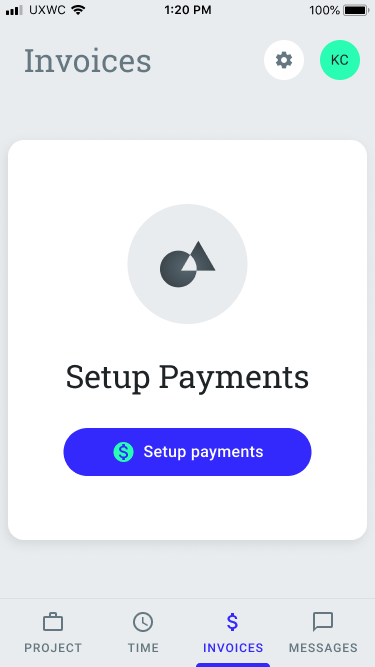
Before: “Invoices”, “Setup Payments”, and “Setup payments.” The screen did not explain whether the freelancer was preparing to pay someone, get paid, or send a bill.
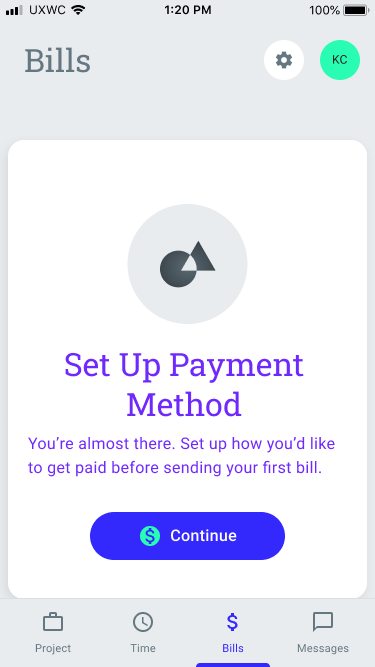
After: “Bills” and “Set Up Payment Method,” followed by: “You’re almost there. Set up how you’d like to get paid before sending your first bill.” The button reads “Continue.”
Why I made this change
The heading now names the task, and the supporting copy explains why it has to happen before the first bill. It also uses Bill, the preferred term in the style guide.
I would make one more production change: replace Continue with Choose payment method. The current label works in a sequential flow, but the more specific action better follows the guide and reduces ambiguity.
Clarify what happens after an invitation
User goal: Invite the other party, understand what they will receive, and know what happens next.
Before
After
What changed
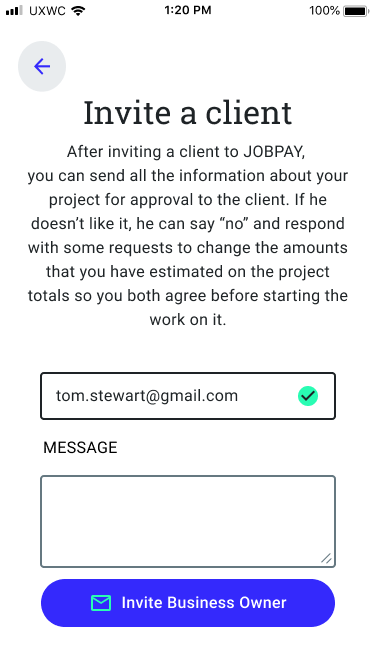
Before: “Invite a client,” a long paragraph about approval and estimates, and the button “Invite Business Owner.” The screen shifted between client and Business Owner and included a gendered reference to “he.”
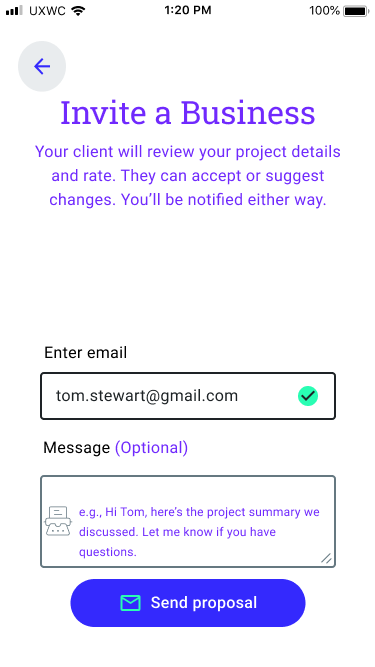
After: “Invite a Business” and: “Your client will review your project details and rate. They can accept or suggest changes. You’ll be notified either way.” The form uses “Enter email” and “Message (Optional),” and the action is “Send proposal.”
Why I made this change
The revised copy answers three questions in order: what the business will review, what they can do, and what the freelancer can expect next. The visible field labels and example message also make the form easier to understand.
I would not ship this screen exactly as it is. It still uses both Business and client, and it does not fully resolve whether the action is an invitation or a proposal. In a production pass, I would define the object first and use it consistently in the heading, supporting copy, and action.
Accessibility and implementation
Because this was a course project, I did not complete an accessibility audit or engineering handoff. Before release, I would work with design and engineering to check:
- Programmatic labels and focus order for fields and actions
- Announcements for changing states such as Awaiting approval
- Currency and date localization outside the United States
- Message length and truncation at smaller device sizes
- Terminology consistency across freelancer and business flows
What I would validate next
I would test whether participants can:
- Explain what happens after they send a budget
- Tell the difference between editing a budget and cancelling the approval action
- Identify the payment method they are setting up and why it is needed before a first bill
- Recognize whether Business, client, and proposal refer to the same person or action
Those sessions would show whether the revisions actually reduce uncertainty, not just whether they read well on a static screen.
Reflection
The biggest lesson was simple: vague copy becomes a real problem when money, approval, and timing are involved. People should not have to pause and interpret the interface before moving forward.
My best revisions gave each step a clearer purpose, audience, and next state. I want to keep doing that kind of work: making a complicated product easier to use before someone has to ask for help.